Un tutoriel pour débutant apprenant les bases du tracking. En anglais. Je suis l’auteur de ce tutoriel.
Avec l’utilisation d’un Null Object dans Autodesk Combustion, le tracking d’un mouvement peut se distribuer à n’importe quel élément que vous souhaitez incorporer dans votre scène. Chaque élément est parenté au Null Object et bouge de façon identique.
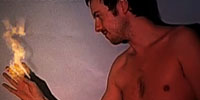
Retrouvé dans mes archives Artworx : texte du 31 août 2003, billet publié sur Compositing.fr en 2008. Il s’agit entièrement d’effets visuels numériques, avec un logiciel aujourd’hui historique.
Quick tutorial: He’s On Fire!
Quick tutorial (intermediate) : He's On Fire !
keywords: combustion, tracking, parenting
1. Create a New Project (Resolution of your choice)
2. Import the footage of someone walking/running
3. Right click on Composite and select New Null Object
4. click on Null Object in the workspace
5. select the Tracker
6. click on source and select your footage
7. click on Position
8. move the tracker's Squares on the head of your walking man
9. click and maintain the Control key, and adjust the external square to the
size of the head
9. click and maintain the Control key, and adjust the internal square to the
face
10. Click on Fixed and choose Roaming
11. Set the tolerance to 45%
12. Start Analyze (3rd button)
13. Once track complete, set the Track to Off
14. Go at the first frame of your composite
15. right click on composite and select New layer. In Type, choose Particles.
Enable Transparent, and click OK
16. The Particles of our new layer is now selected. Go in Particles Controles /
Settings, click on Background:None and choose you "walking man footage"
17. Click on Library, Enable Preview, choose Flames
18. Click in Toolbar : first icon (Point Emitter Tool)
19. click on the head of your man
20. disable Preview, go in Emitter and set Preload Frames to 30
21. In Workspace, click on the Particles Layer, then in Composite Controles,
click on Layer, and set the Parent to Null Object
22. Double click on your Composite, then click play and see the results
xx: you can add any number of other particles (smoke etc) or layers then
parent them to the track done on Null Object
À lire également : Mon test de matchmoving 3D avec SynthEyes et Fusion.
